




Safaricom has pushed version 5.1.5 of My OneApp to the Google Play Store, and the update goes straight after the two things users complained about most since launch.
The Favourites tab returns to the transactions section. You can save the contacts you pay most often and reach them in seconds, no more scrolling through your full transaction history every time. Alongside that, the Frequents section now does a better job of putting your most-used services front and centre. The apps and actions you open every day move closer to the surface, so routine tasks take fewer steps.
Both fixes sound small in isolation. For anyone who sends money to the same people every week or pays the same bills every month, they make a real difference.
What You Can Actually Do Inside My OneApp
My OneApp merges the old M-PESA, MySafaricom, and Bonga apps into one. The home screen shows your M-PESA balance, data bundle, airtime, and Bonga points the moment you open the app. No digging through menus to find what you have left.
Here is a breakdown of what the app covers:
Send and receive money Send money to M-PESA users, bank accounts, and contacts you have saved as favourites. The app shows your recent transactions and lets you repeat a payment in a couple of taps.
Pay for goods and services The app supports three payment methods: Scan to Pay using a QR code, NFC tap-to-pay, and AI Pay, which recognises merchants and streamlines checkout. Whether you are paying at a supermarket, a small shop, or online, the payment screen handles it without switching apps.
Buy airtime, data bundles, and home fibre Purchase airtime for yourself or for someone else directly from the home screen. Data bundles and home fibre packages sit in the same section, so topping up takes seconds.
Invest, borrow, and insure through M-PESA This is where My OneApp moves beyond what the old apps offered. The Ziidi money market fund sits inside the M-PESA flow, letting you save and earn returns without opening a separate investment app. Trader share-trading tools also live inside the app for users who want to buy and sell shares. On the borrowing side, M-PESA lending products remain accessible directly from the dashboard. Insurance options round out the financial services section.
Access over 80 third-party services The app hosts a broad catalogue of partner services, ranging from train ticket bookings to M-TIBA health insurance. You access all of them without leaving My OneApp, and Safaricom learns which ones you use most to surface them on your home screen over time.
Check and redeem Bonga points Your Bonga points balance displays alongside your other balances on the home screen. You can redeem points directly from the app without calling a shortcode or visiting a separate portal.
Manage your account and get support Common support requests, such as reversals, SIM queries, and account issues, sit inside the app. You raise and track them without calling the Safaricom helpline or visiting a service centre.
Smart suggestions based on your habits The app uses machine learning to notice patterns in what you do. If you pay your Kenya Power bill on the same date every month, the app prompts you to complete the transaction before you even open the payments section. The longer you use it, the more it anticipates your routine.
How My OneApp Came Together
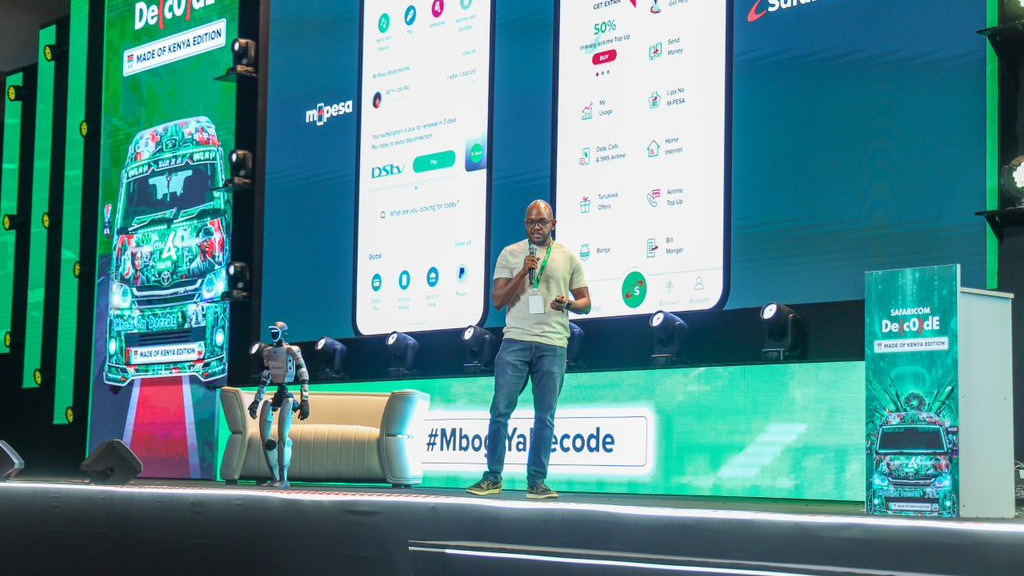
Safaricom unveiled the platform on 2 April 2026 at its Decode 4.0 engineering summit, combining M-PESA, MySafaricom, and Bonga into one app. The infrastructure runs on a cloud-native architecture capable of processing 6,000 transactions per second, built to serve millions of simultaneous users without slowing down.
My OneApp forms the foundation of what Safaricom calls its FinTech 2.0 strategy, a push to consolidate more than 10 million users onto a single platform as Kenyan banks, neobanks, and fintechs build competing products.
The Launch Problems That Led to This Update
The app did not land smoothly. Roaming and diaspora users struggled to log in. Others found their phones had updated automatically to My OneApp, dropping them into an unfamiliar interface with no warning. Complaints about a cluttered interface, missing offline functionality, and constant crashes dominated early reviews on the Play Store.
Safaricom responded publicly.
“This is not what we promised, and for that we are sorry,” the company said. It followed with a direct commitment: “Our teams are working around the clock to resolve the issues you have raised, so that whether you are in Kenya or abroad, you can seamlessly access and use My OneApp.”
Version 5.1.5 is the first concrete result of that work.
What Users Are Still Saying
User reviews on the Play Store since launch reflect a mixed picture. Several users flag that the app requires a data or Wi-Fi connection even for basic functions, a step backward from the old M-PESA app which handled some actions offline. Others describe the interface as congested, with too many options packed onto one screen. Performance complaints, covering lag, crashes, and slow load times, appear frequently.
Safaricom has acknowledged the feedback and continues to release fixes. Version 5.1.5 addresses navigation and transaction usability. Broader performance and offline access issues remain on the list of concerns users want resolved.
The Scale Behind the App
M-PESA’s reach explains why every update to this platform matters. As of March 2026, M-PESA serves 40 million customers in Kenya and over 60 million customers across markets beyond Africa, alongside 5 million businesses in eight countries. It processes more than $400 billion (Ksh 51.6 trillion) in transactions every year.
At that scale, fixing the Favourites tab is not a minor housekeeping task. It is Safaricom showing its users that the feedback they submitted went somewhere and produced a result.
The update is live now. Open the Google Play Store, search for My OneApp, and tap update to get version 5.1.5.
